
 16.5K GitHub Stars
Tutorial: Deploying GPU-Accelerated Presto
Three notebooks for adding GPU acceleration to an existing Presto warehouse are now available in the Presto Prestorials Github repository. NVIDIA GPUs accelerate Presto without reinstallation or moving data. Clone and run these notebooks to setup a “hello, world” dual Presto cluster running CPU and GPU in parallel: https://github.com/prestodb/prestorials/tree/main/docker-compose-native/cpu-and-gpu
The following container images are used to create the GPU Presto cluster with Velox + NVIDIA cuDF:
prestodb/presto:coordinator-gpu-nightly
prestodb/presto-native:gpu-nightly
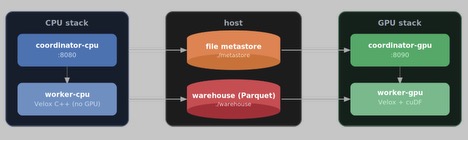
Description: Parallel CPU and GPU Presto Docker clusters accessing data and metadata on shared host.
Background
Latency degrades as data volumes grow. Presto is designed to maintain responsiveness for interactive analytics across large datasets, but like any engine, slows when overleveraged. In GPU-accelerated Presto, compute heavy operations like scanning, aggregation, and grouping decompose down to NVIDIA CUDA primitives that execute in parallel over thousands of GPU cores instead of a handful of cores on a CPU. By executing on the GPU, Presto workloads can speed-up by up to 12x. You can benchmark Presto with Velox on GPUs here.
What Runs on the GPU
Presto is accelerated through its execution engine, which is based on Velox, the open-source, native C++ project. Velox integrates with NVIDIA cuDF to transfer executors to GPU workers. Learn more about how Velox and cuDF work together here. Analyzing data with GPU or CPU execution does not require changing SQL. We have the following video guide as a companion to the three notebooks in the prestorial.
https://www.youtube.com/watch?v=KRmln6u9QNk
Set up CPU and GPU clusters side by side
The notebooks set up separate Docker Compose clusters to validate using both query execution accelerators and to test on your own data and queries. The two Docker Compose clusters are:
- CPU cluster with a Java coordinator and a native C++ worker based on Velox
prestodb/presto:latest
prestodb/presto-native:latest
- GPU cluster with a Java coordinator and a native C++ worker that uses Velox and NVIDIA cuDF
prestodb/presto:coordinator-gpu-nightly
prestodb/presto-native:gpu-nightly
Both clusters access the same metastore and warehouse on a shared host. The GPU cluster is deployed beside the CPU cluster rather than replacing it, and mounts the same warehouse and metastore directories as read-only (as opposed to read-write). It is configured for read-only access from the GPU cluster but can be easily flipped to write access in the Docker Compose configuration. You can also run simultaneous queries, one running on the CPU and one on the GPU. The Docker configuration is set up to equally share host CPU and memory resources. The notebooks run the same aggregation query against almost 180 million transactions and compare the execution time on CPU and GPU.
On my local workstation with a 24 core, 48 thread CPU and 256 GB RAM and an NVIDIA RTX PRO 6000 Blackwell, the query completed as follows:
| Engine | Runtime |
| CPU | 5.74 s |
| GPU | 1.6 s |
GPU execution for this demo was 3-4 times faster. Actual performance depends on the hardware, dataset, query operators, file layout, and GPU initialization overhead. As data volumes grow, the expected impact multiplies.
Notebook Prerequisites
- Supported NVIDIA GPU with sufficient VRAM
- NVIDIA Container Toolkit
- Docker runtime
- Python v3.11 or higher
To run on a smaller machine, adjust the settings proportionally:
- Docker container memory limits
- system-memory-gb
- query-memory-gb
- JVM heap allocation for the coordinator
- Worker concurrency (if necessary)
Note that reducing these settings might affect performance and could prevent the largest queries from completing.
Verify Docker GPU access
Before cloning the repository, confirm that Docker can access your NVIDIA GPU.
docker run --rm --gpus all nvidia/cuda:12.4.1-base-ubuntu22.04 nvidia-smi
This command should display information about the installed GPU, driver, available memory, and CUDA runtime.
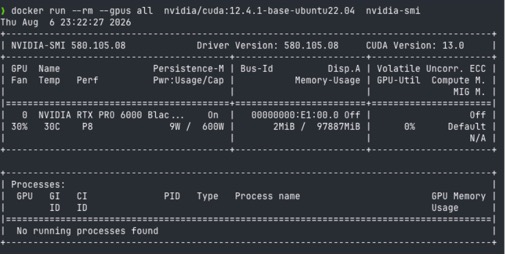
If Docker reports that it cannot select a GPU driver or cannot find an NVIDIA device, verify that:
- The host can run `nvidia-smi`
- NVIDIA Container Toolkit is installed
- Docker has been restarted after installing the toolkit
- Your user has permission to access Docker
When GPU-acceleration pays off
A CPU has a relatively small number of powerful general-purpose cores. A GPU contains many execution units designed to perform similar operations across large batches of data in parallel. Analytical SQL frequently includes operations that can benefit from this architecture:
- Column filtering
- Expression evaluation
- Grouping
- Aggregation
- Sorting
- Large joins
- Columnar Parquet processing
Velox provides the native C++ query execution layer. cuDF provides GPU-accelerated, columnar data-processing operations.
However, GPU execution also introduces overhead:
- GPU libraries and kernels must be initialized
- Data transfer between host and device (GPU)
- Note: When results are large, there can be additional latency from copying from GPU to host memory.
For small datasets, this overhead can exceed the cost of running the query on a CPU.
GPU acceleration is more likely to help when:
- The query processes a large number of rows
- The query performs substantial aggregation or computation
- The operators are supported by the GPU engine
- The input is stored in a columnar format such as Parquet
- The output is small relative to the input
Incidentally, these characteristics are common to Presto workloads!
Summary
In this tutorial, you deployed CPU and GPU Presto clusters beside each other and connected both engines to the same metastore and data. On our RTX Pro 6000, execution improved by 3-4x compared to our CPU with 24 cores and 48 threads.
The more important result is the deployment pattern. You can evaluate GPU-accelerated SQL without rebuilding or duplicating the existing warehouse. Add a GPU query engine beside the CPU deployment, run both queries on the same data – based on the results, you can direct suitable analytical workloads to the engine that performs them most efficiently.
Special Note: NVIDIA has a long history of working with open source communities, including Presto and Velox. NVIDIA is a member of the Presto Foundation.
What’s Next
Try the Prestorial now, and learn more about GPU acceleration here. If you’d like to ask any questions, or give us any feedback, drop them into the Presto slack. This is an open source project so feature requests, issues, and contributions are welcome.