
 16.5K GitHub Stars
From Tables to Transformations – Rich Column-Level Lineage in Presto with OpenLineage
Summary: Presto’s OpenLineage integration now captures not only where output columns come from, but how upstream columns influence them through projections, aggregations, joins, filters, grouping, sorting, windows, and conditional expressions.
Note: The OpenLineage event listener was released in Presto 0.297. The richer direct and indirect column-lineage changes described in this post are merged into
master, which is currently developed as0.299-SNAPSHOT.
Modern data platforms rarely consist of a single database or pipeline. Data flows through catalogs, object stores, warehouses, dashboards, and machine learning systems, often crossing many SQL transformations along the way. When a number looks wrong or a schema must change, one of the first questions is: Where did this data come from?
Table-level lineage provides part of the answer. It can tell us that an output table depends on two input tables. Column-level lineage goes further by identifying the specific input columns behind each output column.
But even that is not the complete story.
A column can affect a result without appearing in the output. A join key determines which rows match. A filter changes the population included in a metric. A GROUP BY column controls aggregation granularity. An ORDER BY expression, window partition, or CASE condition can also influence the result.
Presto can now capture and emit these relationships using OpenLineage, an open standard for exchanging lineage metadata. The integration records both direct value flow and indirect influence, giving lineage consumers a more complete explanation of how a query produced its output.
OpenLineage support in Presto
Presto includes a bundled OpenLineage event listener that emits query lifecycle, dataset, and column-lineage metadata. Events can be written to the coordinator log for testing or sent over HTTP to an OpenLineage-compatible lineage system such as Marquez, Atlan, or DataHub.
Recent enhancements make the column-level metadata more expressive. In addition to identifying the source columns behind an output, Presto records how those columns participate in the query. This information is captured while Presto analyzes the SQL and translated into the standard OpenLineage column-lineage facet.
SQL query
   |
   v
Presto analyzer
   |
   v
OpenLineage event listener
   |
   v
Console or OpenLineage-compatible HTTP endpoint
Capturing both data flow and data influence
Presto represents each relationship with a transformation type and subtype.
| Type | Subtype | Meaning |
|---|---|---|
DIRECT | IDENTITY | The source column is projected directly. |
DIRECT | TRANSFORMATION | The source column is used in a scalar expression. |
DIRECT | AGGREGATION | The source column is used by an aggregate expression. |
INDIRECT | JOIN | The source column is used in a join predicate. |
INDIRECT | FILTER | The source column is used in a WHERE or HAVING predicate. |
INDIRECT | GROUP_BY | The source column controls grouping. |
INDIRECT | SORT | The source column is used by ORDER BY. |
INDIRECT | WINDOW | The source column is used in a window partition or sort key. |
INDIRECT | CONDITIONAL | The source column is used in a CASE, IF, or similar condition. |
This distinction matters because “the value came from this column” and “this column affected whether or how the value was produced” are different relationships.
Consider the following CTAS query:
CREATE TABLE hive.analytics.customer_revenue AS
SELECT
    c.custkey AS customer_id,
    c.name AS customer_name,
    sum(o.totalprice) AS total_revenue
FROM hive.tpch.customer c
JOIN hive.tpch.orders o
    ON c.custkey = o.custkey
WHERE o.orderstatus = 'F'
GROUP BY c.custkey, c.name;
At table level, the new table depends on customer and orders. Rich column-level lineage explains more:
customer_iddirectly projectscustomer.custkey.customer_namedirectly projectscustomer.name.total_revenuedirectly aggregatesorders.totalprice.customer.custkeyandorders.custkeyinfluence the result as join keys.orders.orderstatusinfluences the result through the filter.customer.custkeyandcustomer.namecontrol the aggregation granularity.
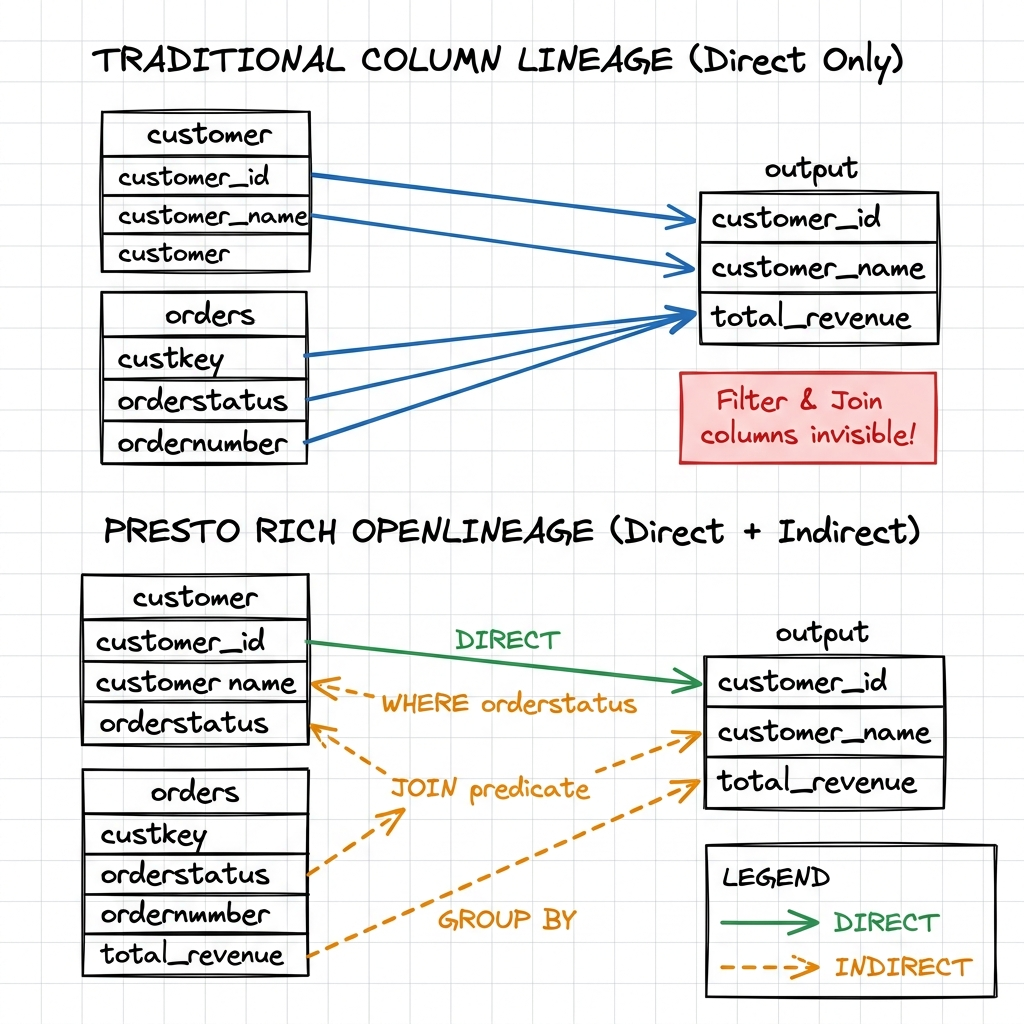
The OpenLineage event contains this information in the output dataset’s columnLineage facet. A shortened, illustrative fragment looks like this:
{
  "fields": {
    "total_revenue": {
      "inputFields": [
        {
          "namespace": "presto://presto-coordinator:8080",
          "name": "hive.tpch.orders",
          "field": "totalprice",
          "transformations": [
            {
              "type": "DIRECT",
              "subtype": "AGGREGATION",
              "description": "Source column aggregated in the projection",
              "masking": false
            }
          ]
        },
        {
          "namespace": "presto://presto-coordinator:8080",
          "name": "hive.tpch.orders",
          "field": "orderstatus",
          "transformations": [
            {
              "type": "INDIRECT",
              "subtype": "FILTER",
              "description": "Source column used in a WHERE or HAVING predicate",
              "masking": false
            }
          ]
        }
      ]
    }
  }
}
The fragment is intentionally abbreviated. A real event can also include join keys, grouping columns, schemas, SQL text, query context, execution statistics, and other OpenLineage facets.
An upstream field can serve more than one role. For example, customer.custkey is both projected into customer_id and used by the join and grouping operations. Presto emits one OpenLineage input field with multiple transformation entries instead of duplicating that field. Consumers can therefore see all of its roles without losing the identity of the upstream column.
Mapping Presto lineage to OpenLineage
The OpenLineage listener emits:
- A
STARTevent when a query is created. - A
COMPLETEevent when it succeeds. - A
FAILevent when it fails.
Input, output, and column-lineage information is available in the completed event, when Presto has the final query I/O metadata.
Presto maps its unified lineage entries to the standard OpenLineage columnLineage dataset facet. Relationship metadata is carried in each input field’s transformations list:
typeisDIRECTorINDIRECT.subtypeidentifies the SQL relationship.descriptionprovides a human-readable explanation.maskingis currentlyfalse.
Using the standard facet avoids a Presto-specific lineage payload and allows OpenLineage-compatible consumers to process the events without a custom SQL parser or proprietary event format.
Getting started
The OpenLineage event listener is bundled with Presto. No additional plugin installation is required.
For an initial test, create etc/event-listener.properties on the coordinator and use the console transport:
event-listener.name=openlineage-event-listener
openlineage-event-listener.presto.uri=http://presto-coordinator:8080
openlineage-event-listener.transport.type=CONSOLE
Run a write query such as CTAS or INSERT, and inspect the coordinator output for OpenLineage JSON events.
Creating or updating
etc/event-listener.propertiesrequires a Presto coordinator restart to take effect. You can verify that the listener initialized cleanly by searching the coordinator log: grep “OpenLineageEventListener” var/log/server.log
To send events to an OpenLineage-compatible HTTP endpoint:
event-listener.name=openlineage-event-listener
openlineage-event-listener.presto.uri=http://presto-coordinator:8080
openlineage-event-listener.transport.type=HTTP
openlineage-event-listener.transport.url=http://marquez:5000
openlineage-event-listener.transport.endpoint=/api/v1/lineage
The listener also supports custom namespaces, job-name formatting, query-type filtering, authentication headers, URL parameters, timeouts, compression, and optional disabling of Presto-specific facets. See the OpenLineage event listener documentation for the complete configuration reference.
What richer lineage enables
The new metadata can improve several common workflows:
More precise data-freshness tracking
Table-level freshness can show when a dataset was last updated, but it does not explain which upstream data affects a specific output column. Column lineage provides that dependency map. When combined with update timestamps or data observability signals, it can help teams trace a stale metric to the relevant upstream columns and propagate freshness expectations through a pipeline.
Indirect lineage makes this analysis more complete. A metric may be calculated from a fresh value column while still depending on a stale join key, filter, or grouping column that changes which records contribute to the result.
Safer impact analysis
Before changing or removing a source column, teams can identify downstream outputs that project it directly and outputs that depend on it indirectly as a join key, filter, grouping key, or condition.
Faster data-quality investigation
If a metric changes unexpectedly, lineage can show not only the columns used in the calculation but also the predicates and joins that changed which records were included.
Better governance and auditing
Column-level relationships provide a more precise record of how data moves and how sensitive fields influence downstream datasets.
Less custom integration work
Presto captures the information during query analysis and emits it through an open standard. Lineage platforms do not need to implement a separate Presto SQL parser to recover the same relationships.
Try it and share feedback
OpenLineage support gives Presto users a standards-based way to export query and dataset lineage. The latest enhancements make that lineage substantially more expressive by distinguishing direct value flow from the indirect relationships that shape query results.
If you operate Presto from master, try the richer column-lineage events with the console transport or connect the listener to your OpenLineage-compatible platform. Feedback, bug reports, and contributions are welcome in the Presto GitHub repository.