
 16.5K GitHub Stars
Presto-Lance Connector: Querying Vector Embeddings with Distributed SQL
As artificial intelligence and machine learning (ML) models become integral to modern software, organizations are storing billions of high-dimensional vectors (embeddings) alongside traditional metadata. Analyzing this multi-modal data at scale requires a bridge between high-performance vector databases and distributed SQL query engines.
Recently, the Presto open-source community introduced a native Lance Connector (added in release 0.297 via PR #27185). This connector enables distributed SQL analytics over Lance datasets directly from Presto.
In this deep-dive article, we will unpack what LanceDB is, why it forms a powerful combination with Presto, and a technical walk-through of the connector’s internal architecture, capabilities, and setup.
What is LanceDB?
LanceDB is an open-source, developer-friendly multimodal lakehouse designed for AI applications. Unlike traditional database servers, LanceDB is embedded (serverless), running directly inside your application process.
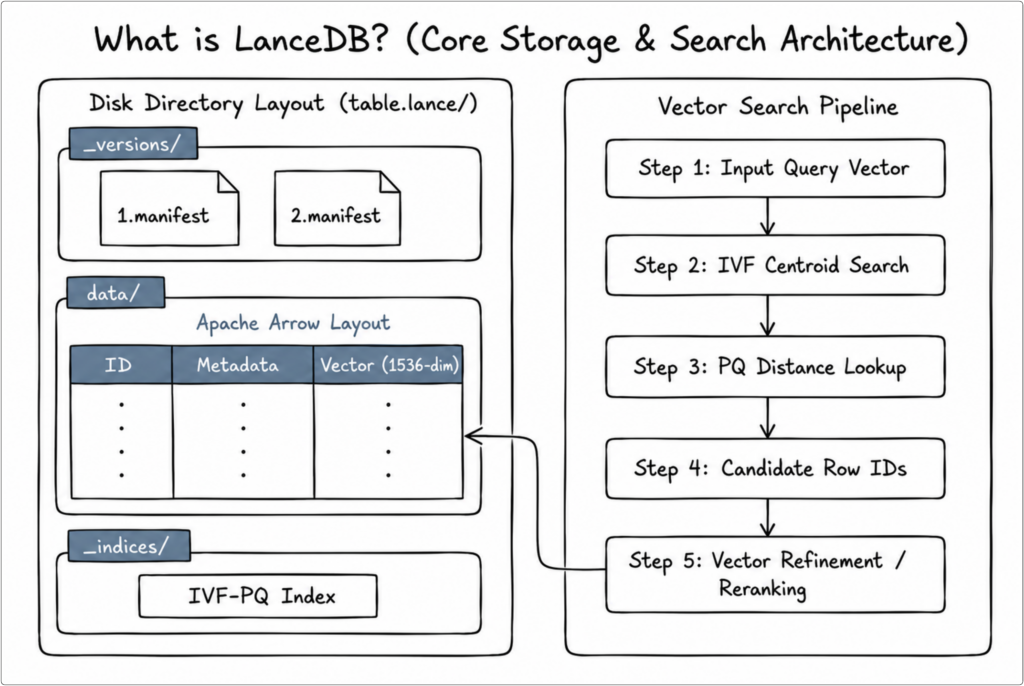
Key Architectural Pillars of LanceDB:
- The Lance Columnar Data Format: Underneath LanceDB is the Lance format, a modern alternative to Apache Parquet designed specifically for ML, multi-modal data, and vector search.
- Random Access: Lance is up to 100x faster than Parquet for random access lookups, making vector similarity search and point queries highly performant.
- Native Vector Indexing: Lance natively supports state-of-the-art vector indexes such as IVF-PQ (Inverted File with Product Quantization), which quantizes high-dimensional vectors to speed up approximate nearest neighbor (ANN) searches.
- Zero-Copy Integration with Apache Arrow: Lance is built natively on top of the Apache Arrow ecosystem. This allows seamless, zero-copy memory sharing with modern data science tools like pandas, Polars, PyTorch, and Hugging Face.
- Disk-Backed Vector Search: Many vector databases are memory-bound, requiring all vectors and indexes to reside in RAM (e.g., standard HNSW implementations). LanceDB uses disk-based indexing, allowing it to scale to billions of vectors on local NVMe drives or cheap cloud object storage (Amazon S3, Google Cloud Storage, Azure Blob Storage) with minimal memory overhead.
- Snapshot Isolation & Git-like Versioning: Lance uses an append-only transaction log. This supports full dataset versioning, transaction rollbacks, and concurrent readers’ query consistency (snapshot isolation).
Below is a schematic overview of LanceDB’s embedded columnar architecture:
How the Presto-Lance Connector Works?
The Presto-Lance connector leverages the Lance Java SDK (which calls native Rust libraries via JNI) to interface with Lance datasets. Below is a high-level schematic of how the connector integrates into Presto’s distributed architecture:
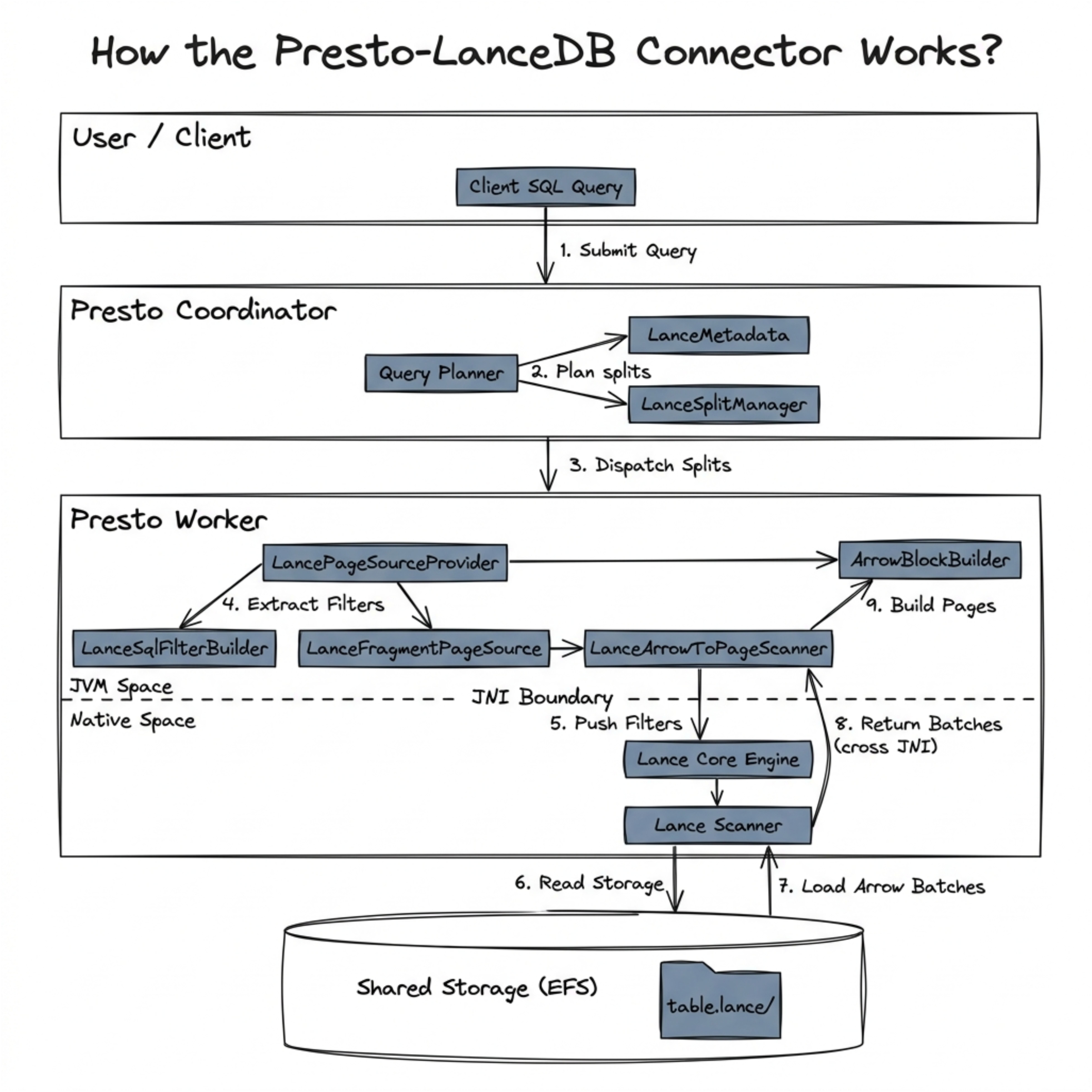
Architectural Components Breakdown:
1. LancePlugin (LancePlugin.java)
- Entry point for Presto connector framework.
- Registers
LanceConnectorFactory. - Minimal implementation following Presto SPI.
public class LancePlugin
        implements Plugin
{
    @Override
    public Iterable<ConnectorFactory> getConnectorFactories()
    {
        return ImmutableList.of(new LanceConnectorFactory());
    }
}
2. LanceConnector (LanceConnector.java)
- Manages the connector lifecycle and handles initialization/shutdown hooks.
- Coordinates SPI components (Metadata, Split Manager, and Page Source/Sink Providers).
- Manages transactions (snapshot isolation via versioning) and session properties.
3. LanceMetadata (LanceMetadata.java)
- Implements Presto’s
ConnectorMetadatainterface. - Translates Presto metadata operations to Lance operations.
- Manages table creation, insertion, and schema evolution.
4. LanceNamespaceHolder (LanceNamespaceHolder.java)
- Maintains an LRU cache with TTL for opened datasets to avoid the overhead of repeated disk open calls.
- Enforces snapshot isolation by pinning dataset read versions for the duration of a query.
- Safely coordinates concurrent reader threads utilizing Lance’s internal lock manager.
- Manages parent and child Arrow RootAllocators to prevent buffer memory leaks.
Dataset getCachedDataset(String tablePath, Optional<Long> version)
{
    DatasetCacheKey cacheKey = new DatasetCacheKey(tablePath, version);
    try {
        return datasetCache.get(cacheKey, () -> {
            if (version.isPresent()) {
                long v = version.get();
                checkArgument(v <= Integer.MAX_VALUE,
                        "Dataset version %s exceeds maximum supported version", v);
                ReadOptions versionedOptions = new ReadOptions.Builder()
                        .setIndexCacheSizeBytes(readOptions.getIndexCacheSizeBytes())
                        .setMetadataCacheSizeBytes(readOptions.getMetadataCacheSizeBytes())
                        .setVersion((int) v)
                        .build();
                return Dataset.open(tablePath, versionedOptions);
            }
            return Dataset.open(tablePath, readOptions);
        });
    }
    catch (ExecutionException | UncheckedExecutionException e) {
        throw new PrestoException(LanceErrorCode.LANCE_ERROR, "Failed to open dataset: " + tablePath, e.getCause());
    }
}
5. LanceSplitManager (LanceSplitManager.java)
- Generates splits for parallel query execution.
- Maps each Lance data fragment to a separate Presto split.
- Enables distributed processing by scheduling splits across workers.
# Split Strategy
Dataset (100M rows)
├── Fragment 1 (1M rows) → Split 1 → Worker 1
├── Fragment 2 (1M rows) → Split 2 → Worker 2
├── Fragment 3 (1M rows) → Split 3 → Worker 3
└── Fragment N (1M rows) → Split N → Worker N
6. LancePageSourceProvider (LancePageSourceProvider.java)
- Creates the execution context for reading data splits in parallel across workers.
- Converts Presto’s logical constraints (e.g., `WHERE age > 25`) into Lance SQL filter strings via
LanceSqlFilterBuilder, allowing the native engine to filter rows on disk and minimize JVM memory usage. - Maps incoming Arrow vectors (such as widening Float16 to Float32) into Presto-native block objects.
7. LancePageSinkProvider (LancePageSinkProvider.java)
- Spawns writing executors that accept incoming query result pages.
- Transforms Presto’s internal page structures back into standard Arrow record batches.
- rites batches to disk as new columnar fragments and appends them to the dataset’s transaction log during the final commit phase (Presto Pages → Arrow Batches → Lance Fragments → Commit).
Presto-Lance: A Powerful Combination for Data Analytics
In modern AI architectures, vector databases are often siloed. Standard analytics platforms cannot easily query vector databases alongside traditional data lakes, forcing data engineers to write custom, heavy Python scripts that extract data from both worlds and perform in-memory joins on single machines.
The Presto-Lance connector solves this bottleneck by turning Lance datasets into first-class SQL tables. By integrating Lance into Presto’s federated query environment, you can run distributed analytical queries directly on multi-modal AI datasets and join them with other enterprise systems like Hive, Iceberg, MySQL, or PostgreSQL in a single query.
Here is a real-world scenario demonstrating the power of combining Presto and Lance, along with the detailed query mechanics of how Presto executes it.
Example: Federated Recommender Evaluation (Cross-Catalog Join)
Scenario: An e-commerce platform stores high-dimensional user interaction embeddings and vector categories in LanceDB (using the embedded Lance engine inside Presto workers, with files stored on shared network storage like NFS or AWS EFS to allow all workers to scan them in parallel), while historical user purchase history and profile tier information reside in an operational database like PostgreSQL.
To evaluate a new recommendation model, analysts need to select Platinum-tier users within a specific age demographic and verify if their recently active vector embeddings match their actual purchases.
-- Evaluates recommendation relevancy by joining LanceDB behavioral metadata with PostgreSQL profiles
SELECT
    l.user_id,
    s.membership_status,
    l.age_group,
    l.last_active_category,
	count(s.order_id) as total_orders_in_category,
	sum(s.order_value_usd) as total_spent_usd
FROM
    lance.default.user_behavior_embeddings l
JOIN
    postgresql.retail.orders_and_profiles s
ON
    l.user_id = s.user_id
	AND l.last_active_category = s.product_category
WHERE
    l.age_group = '25-34'
	AND s.membership_status = 'Platinum'
GROUP BY
    l.user_id,
    s.membership_status,
    l.age_group,
    l.last_active_category
HAVING
	count(s.order_id) > 5
ORDER BY
    total_spent_usd DESC;
Query Execution Mechanics:
- Predicate Pushdown: Presto parses the query and pushes the filter l.age_group = ’25-34′ directly down to the LanceSqlFilterBuilder.
- Pruned Scan: The native Lance scanner evaluates the filter on disk, reading only the matching fragments.
- Distributed Hash Join: The matching rows are loaded into Presto worker memory as Arrow RecordBatches, coerced to Presto pages, and joined in parallel across the Presto cluster with the filtered user records fetched from PostgreSQL.
Configuration Options, Capabilities & Limitations
For detailed configurations, SQL operations supported, data type mapping, and limitations, see Lance connector docs
Step-by-Step Setup Guide
Step 1: Create Catalog Properties
Create a catalog configuration file named etc/catalog/lance.properties in your Presto installation directory:
connector.name=lance
lance.root-url=/path/to/local/lancedb/storage
lance.single-level-ns=true
Step 2: Configure Cache Sizes (Optional)
To speed up recurring queries, you can tune the cache properties inside lance.properties:
# Cache settings
lance.index-cache-size=256MB
lance.metadata-cache-size=256MB
lance.dataset-cache-max-entries=200
lance.dataset-cache-ttl=30m
Step 3: Start Presto and Run Queries
Start your Presto server. Connect to Presto via the CLI and create a table:
-- Create a Lance table via Presto
CREATE TABLE lance.default.articles (
    id BIGINT,
    title VARCHAR,
    popularity DOUBLE
);

-- Insert data
INSERT INTO lance.default.articles VALUES
(1, 'Introduction to LanceDB', 94.5),
(2, 'Presto Federated Queries', 88.2);

-- Query the table
SELECT * FROM lance.default.articles WHERE popularity > 90.0;
Community, Ecosystem, and How to Contribute
By bridging the gap between distributed SQL engines and AI data formats, the Presto-Lance connector establishes high-dimensional vector embeddings as native, queryable assets in the modern analytical lakehouse.
Get Involved: Explore the source code under presto-lance to see how the SDK integration works and submit a Pull Request.
Conclusion
The Presto-Lance connector represents a significant step forward in bridging the gap between traditional SQL analytics and modern vector databases. By combining Presto’s powerful distributed query engine with LanceDB’s efficient columnar storage and versioning capabilities, organizations can now:
- Run complex SQL queries on vector data
- Leverage time-travel for reproducible ML experiments
- Scale horizontally with shared network storage (such as AWS EFS) and cloud-mounted storage layouts
- Integrate vector search into existing data pipelines
- Maintain ACID snapshot isolation for concurrent analytical workloads
Whether you’re building recommendation systems, semantic search applications, or ML platforms, the Presto-Lance connector provides a robust, scalable, and SQL-native solution for your vector data needs.