
 16.5K GitHub Stars
Iceberg Branches and Tags with Presto
Modern data lakehouses increasingly require versioned data access, auditability, and safe experimentation without affecting production systems. Apache Iceberg allows you to maintain multiple concurrent timelines of a table through Branches and capture static historical points using Tags. This mechanism is heavily inspired by Git but operates on underlying table snapshots.
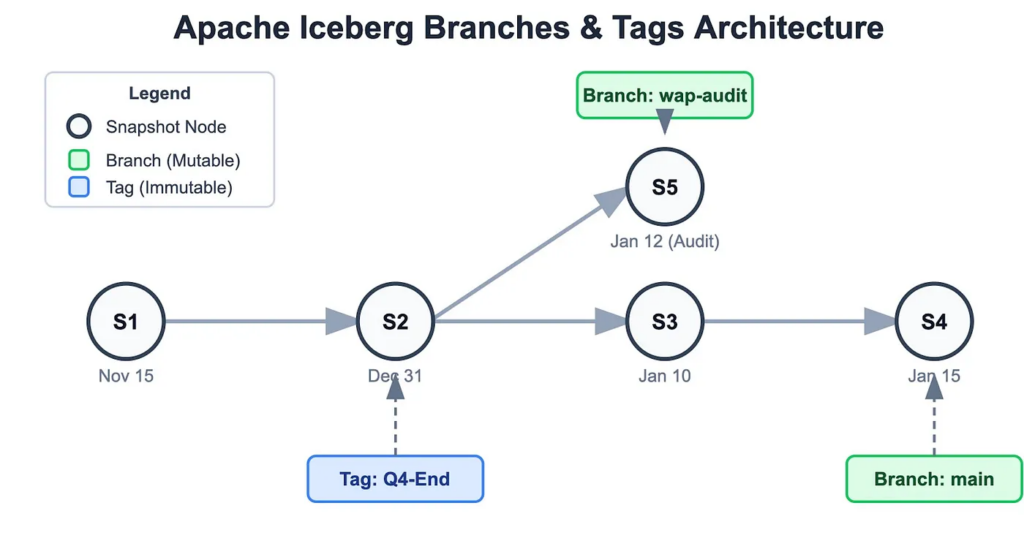
In this blog, we are going to see the support provided by PrestoDB for Apache Iceberg branches and tags, which includes:
- Creating and dropping branches and tags
- Querying branches and tags
- Mutations on branches
- Running workloads without impacting the production data
- Support for Java workers and Prestissimo (Presto C++)
All the mentioned Iceberg branch and tag functionalities are available in PrestoDB version ≥ 0.297
What are Iceberg Branches and Tags?
Branch: A branch is a mutable reference to a snapshot. Write operations can be performed on it independently.
Use cases:
- Data validation pipelines
- Audit workflows
- Experimentation
- CI/CD for data
Tag: A tag is an immutable reference to a snapshot.
Use case: Compliance snapshots
Creating Iceberg Branches Or Tags in PrestoDB
PrestoDB provides SQL syntax to create tags and branches directly.
Create a Branch Or a Tag
presto> ALTER TABLE iceberg.default.mytable CREATE TAG 'audit-tag';presto> ALTER TABLE iceberg.default.mytable CREATE BRANCH 'audit-branch';Create a Branch Or a Tag for a Specific Snapshot
presto> ALTER TABLE iceberg.default.mytable
CREATE TAG 'audit-tag'
FOR SYSTEM_VERSION AS OF 3;
presto> ALTER TABLE iceberg.default.mytable
CREATE BRANCH 'audit-branch'
FOR SYSTEM_VERSION AS OF 3;
Create a Branch Or a Tag Using Timestamp
presto> ALTER TABLE iceberg.default.mytable
CREATE TAG 'audit-tag'
FOR SYSTEM_TIME AS OF TIMESTAMP
'2024-03-02 13:29:46.822 America/Los_Angeles';presto> ALTER TABLE iceberg.default.mytable
CREATE BRANCH 'audit-branch'
FOR SYSTEM_TIME AS OF TIMESTAMP
'2024-03-02 13:29:46.822 America/Los_Angeles';Create a Branch Or a Tag with a Retention Policy
presto> ALTER TABLE iceberg.default.mytable
CREATE TAG 'audit-tag'
FOR SYSTEM_VERSION AS OF 3
RETAIN 7 DAYS;presto> ALTER TABLE iceberg.default.mytable
CREATE BRANCH 'audit-branch'
FOR SYSTEM_VERSION AS OF 3
RETAIN 7 DAYS;Retention allows automatic cleanup of old metadata references.
Querying Iceberg Branches and Tags in PrestoDB
Querying a Branch
PrestoDB supports two syntaxes for querying branches.
- Querying the branch using FOR SYSTEM_VERSION AS OF syntax:
presto> SELECT * FROM table_name FOR SYSTEM_VERSION AS OF 'branch_name';- Querying the branch using dot notation syntax:
presto> SELECT * FROM "table_name.branch_branchName";Here, branch_ is the keyword required along with the branchName we are trying to query
Querying a Tag
presto> SELECT * FROM table_name FOR SYSTEM_VERSION AS OF 'tag_name';Dropping Branches and Tags
Dropping references is straightforward. Dropping a branch or tag does not delete underlying data. It simply removes the reference to the snapshot.
presto> ALTER TABLE users DROP BRANCH 'branch1';
presto> ALTER TABLE users DROP TAG 'tag1';
Mutating Iceberg Branches from PrestoDB
One of the most powerful capabilities is isolated mutations on a branch. All the operations below modify only the branch snapshot lineage, leaving the main branch unaffected.
This enables powerful workflows such as:
- Staging transformations
- Data quality validation
- Safe backfills
- Pipeline experimentation
Example:
presto> ALTER TABLE orders CREATE BRANCH 'audit_branch';
All mutations can now be directed to that branch.
Insert into a Branch
presto> INSERT INTO "orders.branch_audit_branch"
VALUES (1, 'Product A', 100.00);
Update Data in a Branch
presto> UPDATE "orders.branch_audit_branch" SET price = 120.00 WHERE id = 1;
Delete Rows from a Branch
presto> DELETE FROM "orders.branch_audit_branch" WHERE id = 2;
Merge into a Branch
presto> MERGE INTO "orders.branch_audit_branch" t
USING source_table s
ON t.id = s.id
WHEN MATCHED THEN UPDATE SET price = s.price
WHEN NOT MATCHED THEN INSERT (id, product, price)
VALUES (s.id, s.product, s.price);
Truncate a Branch
presto> TRUNCATE TABLE "orders.branch_audit_branch";
Support in Prestissimo (Presto C++)
If you are running PrestoDB with Prestissimo (C++ workers), most of the above branch and tag functionality works seamlessly. In Prestissimo clusters, branch mutations are currently limited to:INSERT TRUNCATE
Support for additional mutation operations may be added in future releases.
Final Thoughts
With the help of iceberg branches and tags, version control can be implemented in data lakes using Git version control systems. PrestoDB allows access to these using simple SQL constructs. With the help of such features, PrestoDB allows safe experimentation, auditing, and reproducibility in modern data systems.
If you’re building lakehouse architectures with Presto and Iceberg, branches and tags should become a fundamental part of your data workflow design.